
Meal Planning Made Easy: Two Flexible Approaches in Deglaze
Jacob Edelstein · February 8, 2026
There's a frustrating pattern many home cooks fall into: You love cooking. You have dozens (or hundreds) of saved recipes. You even enjoy the actual time spent in the kitchen. But somehow, Thursday evening rolls around and you're ordering takeout again because you don't have ingredients for anything and can't quickly decide what to make.
This was exactly the problem we faced when we started building Deglaze. We weren't cooking less because we'd lost interest in cooking—we were cooking less because of all the friction involved in everything before cooking. Standing in the grocery store parking lot trying to remember what we had at home. Scrolling through recipe apps for 20 minutes trying to pick something. Realizing too late that we were missing a key ingredient.
The solution? Meal planning. Not the rigid, every-meal-mapped-out-for-a-month kind of planning (unless that's your thing). But some intentional thinking ahead about what you'll cook, combined with a system that makes grocery shopping effortless.
When you plan meals—even loosely—you're dramatically more likely to actually cook them. And when you cook more, you eat better, save money, and rediscover why you loved cooking in the first place.
Why Meal Planning Makes You Cook More
The magic of meal planning isn't really about the calendar or the organization. It's about removing decision fatigue and logistical friction at the exact moments when you're most likely to give up and order in.
No more decision paralysis. When you've already decided what to cook, you skip the 30-minute scroll through your recipe app trying to figure out what sounds good. The decision is made. You just cook.
No more missing ingredients. When you plan meals and add them to your grocery list in advance, you actually have what you need when it's time to cook. No more discovering at 6pm that you're out of garlic.
No more mental overhead. Instead of constantly wondering "what's for dinner?" throughout your day, you already know. That mental energy can go toward actually enjoying the cooking process instead of stressing about logistics.
The key is having a meal planning app that makes the planning process as frictionless as possible. Many recipe apps treat grocery shopping and meal planning as secondary features tacked onto recipe organization. Deglaze makes sure everything works seamlessly together—from discovering and organizing recipes to planning meals to shopping efficiently.
The results speak for themselves: in a 2025 survey of 358 Deglaze users, 84% who adopted either of the meal planning approaches described below reported cooking more often, and 81% said they were spending less money on food overall (combining groceries and takeout). When meal planning actually works, the benefits compound quickly.
Two Approaches to Meal Planning in Deglaze
Here's the thing about meal planning: there's no one-size-fits-all approach. Some people thrive with detailed weekly meal plans. Others prefer a more flexible system. That's why Deglaze offers two distinct ways to plan meals, and you can use whichever fits your cooking style (or switch between them as your needs change).
Meal Planning Lite: Flexible Planning for Spontaneous Cooks
If you value flexibility and typically plan just a few recipes at a time rather than mapping out a full week, what we call "Meal Planning Lite" is probably your best option. It's a simpler, more spontaneous approach to meal planning that still removes the friction that keeps you from cooking.
Here's how it works:
Decide what to make. Browse your recipe library to find recipes you want to cook this week. Deglaze's smart organization system makes this easy—you can filter by course, type, dietary preferences, cooking time, or search by ingredients. Already know what you want? Jump straight to adding it to your list.
Add recipes to your grocery list. When you find recipes you want to make this week, simply add them to your grocery list app in Deglaze. The app automatically extracts all the ingredients and adds them to your list. If you're a Deglaze Pro subscriber, the list gets organized by grocery store aisle to make shopping even faster — and when your week spans more than one shop, you can tag and filter grocery items by store.
Shop once for multiple meals. Instead of planning specific days, you're just stocking up on ingredients for 3-4 recipes you want to make soon. You can shop in-store using the organized list, or send your list directly to Instacart for delivery.
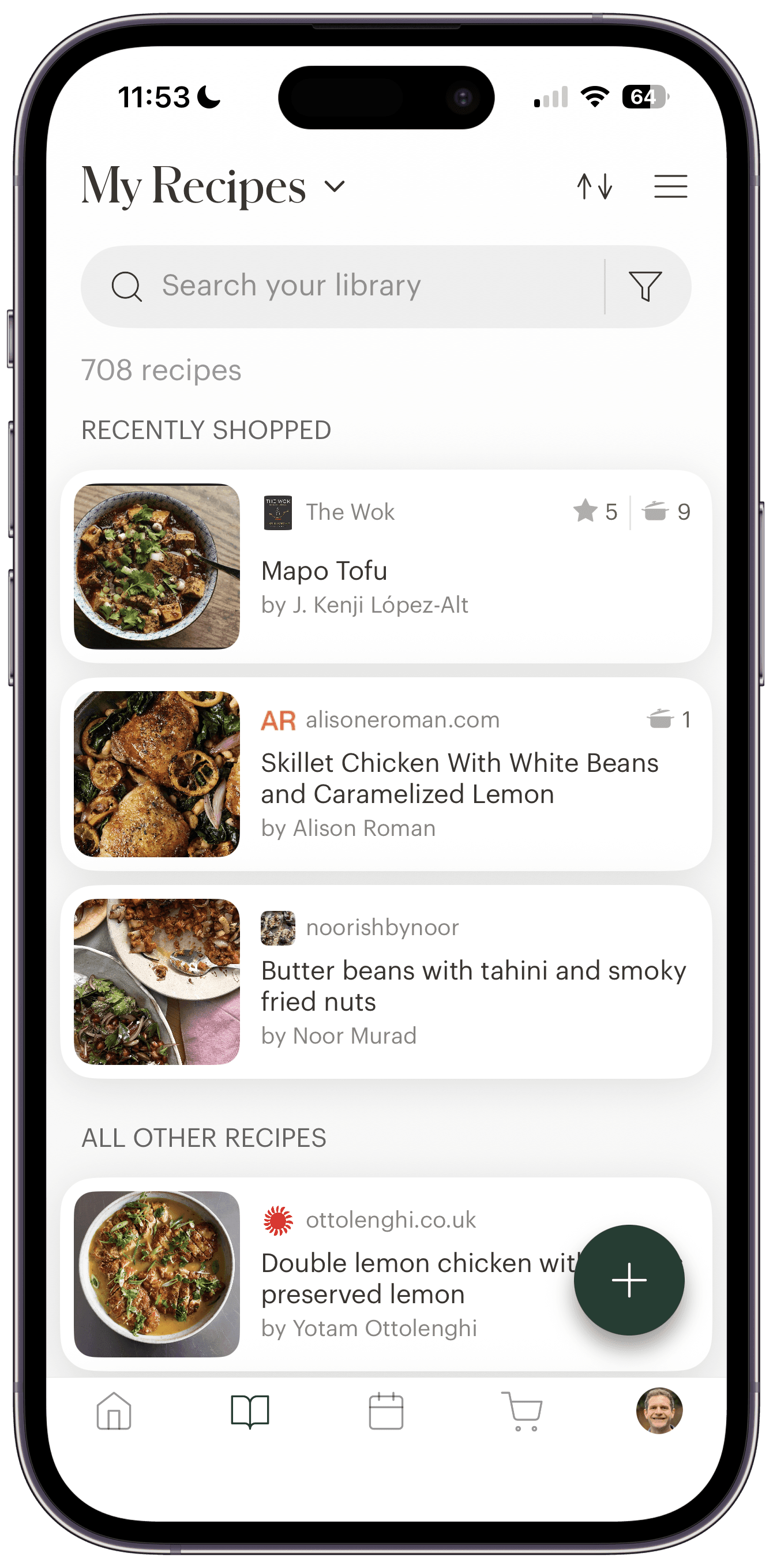
See what you have ingredients for. This is where the system really shines. Deglaze automatically surfaces recipes from your grocery list at the top of your recipe library in a "Recently Shopped" section. Every time you open the app, you immediately see what you have groceries for—no hunting through your entire collection.
Cook when you're ready. When it's time to make dinner, you choose from your Recently Shopped recipes based on what sounds good that evening. Once you cook a recipe, it automatically gets removed from this section, keeping your view clean and focused.
This workflow creates a beautiful simplicity: you always know what you can cook right now, but you're not locked into eating specific things on specific days. It's structured enough to ensure you have ingredients and options, but flexible enough to match your actual appetite and schedule.
Full Meal Planning: Structure for the Week Ahead
If you prefer more structure or need to coordinate meals with a partner or family, Deglaze's full meal planner gives you a calendar-based approach to planning meals. This approach often works particularly well for busy families with kids, where knowing what's for dinner each night eliminates daily decision-making stress and makes it easier to coordinate schedules and preferences.
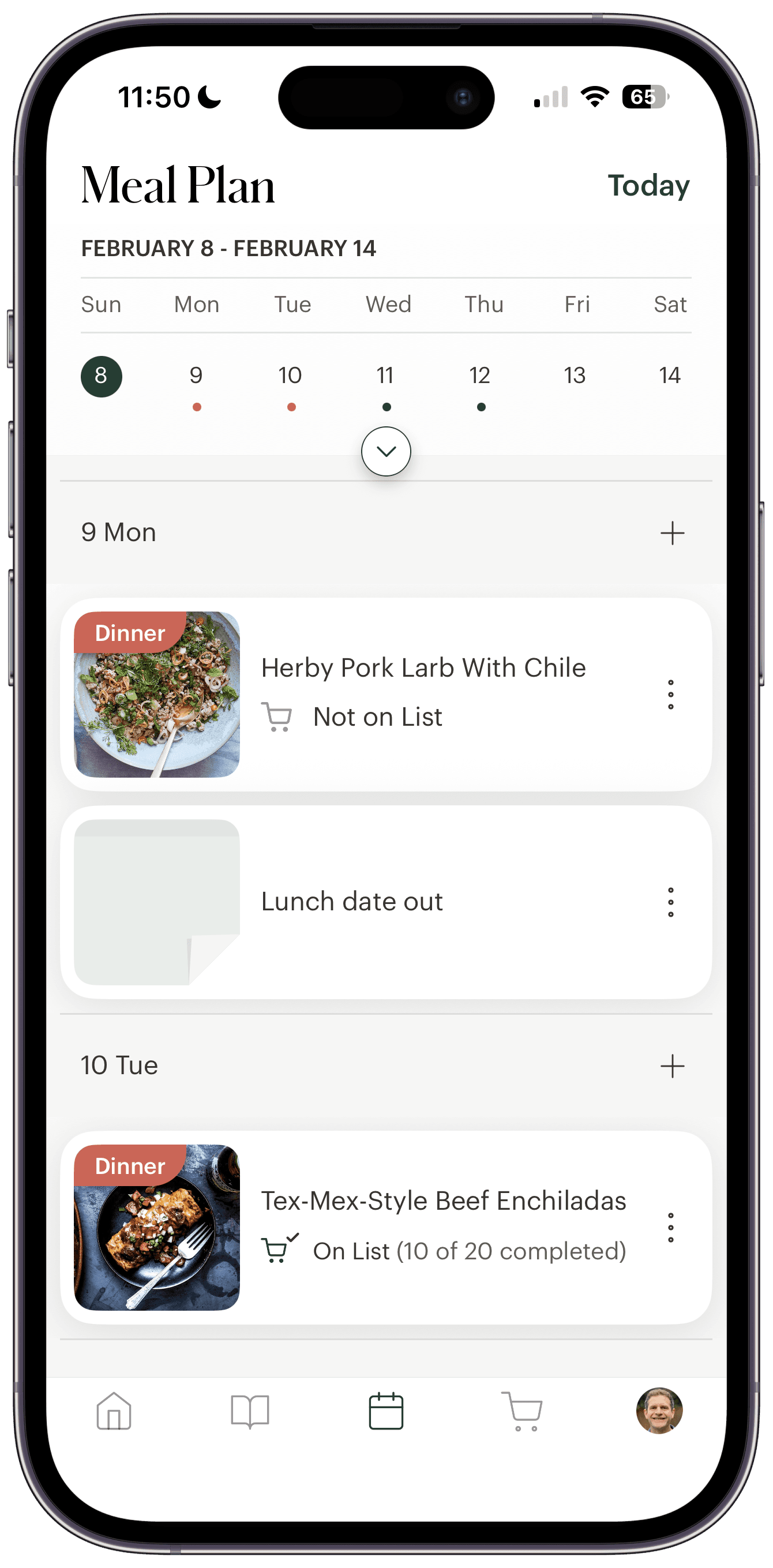
Add recipes to a calendar. Browse your recipe library to find what you want to cook, then schedule specific recipes for specific days with labels for breakfast, lunch, dinner, or snacks. Deglaze's organization system makes it easy to quickly find the right recipes for your plan. On the web, you can also drag recipes from your library straight onto a day.
Rearrange your week with drag and drop. Plans change. Press and hold any meal to drag it to another day, or press and hold a day's header to move the whole day. Drop a day onto one that already has meals and you can swap the two days or move the meals over. Every move comes with an Undo. It works on the web too, where you move a whole day by dragging its column header.
Include non-recipe meals. Not every meal comes from a recipe. You can add notes directly to the calendar for things like "leftovers," "eating out," or "pizza night." This gives you a complete view of your week, even for meals that don't require cooking.
Track grocery status for each meal. Here's something most meal planning apps miss: Deglaze shows you the grocery list status for each recipe on your plan. You can see at a glance whether a scheduled recipe is on your grocery list and how many ingredients are still pending. This makes it incredibly easy to understand the overall status of your planned meals without digging through multiple screens.
Share with your household. The meal plan is automatically shared with everyone in your Deglaze household, so everyone knows what's for dinner without asking. If you're splitting cooking duties, this visibility makes coordination effortless.
See today's plan prominently. When you open Deglaze, the app shows you what's on the meal plan for today right at the top of your home screen. No need to open the calendar—you immediately know what you're making.
Quick access to planned recipes. Similar to Meal Planning Lite, recipes on your meal plan appear in a special section at the top of your recipe library. This means whether you're using the calendar view or browsing your recipes, the meals you care about this week are always easy to find.
Take your plan everywhere. You can sync your meal plan to your calendar — Apple, Google, or Outlook — so your planned meals show up alongside the rest of your day, and tapping any one opens the recipe in Deglaze.
Choosing Your Meal Planning Style
Both approaches solve the same fundamental problem: making it easy to cook more by reducing friction and decision fatigue. The difference is how much structure you want.
Among Deglaze users who cook regularly, about 63% gravitate toward the Meal Planning Lite workflow while 37% prefer the structured calendar approach. Interestingly, calendar usage jumps to 44% in households with multiple users—which makes sense given the coordination benefits of a shared visual plan.
Choose Meal Planning Lite if you:
- Like deciding what to cook based on how you feel that day
- Usually plan 2-4 recipes at a time rather than a full week
- Cook primarily for yourself or with a flexible household
- Want the simplest possible workflow from recipe to grocery list to cooking
Choose Full Meal Planning if you:
- Prefer knowing exactly what's for dinner each night
- Coordinate meals with a partner or family
- Batch cook or prep on specific days
- Like having a visual overview of the entire week
- Want to track which meals have groceries and which still need shopping
Many Deglaze users actually switch between both approaches depending on the week. A busy week might call for structured planning, while a more relaxed week is perfect for the lite approach. The flexibility is entirely yours.
The Complete Meal Planning Workflow
Regardless of which approach you choose, Deglaze's meal planning system works seamlessly with the rest of the app:
Recipe discovery and organization. Use Deglaze Recipe Search to find new recipes from top food sites, or save recipes directly from your browser and social apps. The recipe organizer uses AI to automatically categorize everything, so you can easily browse by course, type, or dietary preference when you're ready to plan meals.
Quick recipe scaling. Before adding a recipe to your grocery list or meal plan, you can scale it up or down. If you're a Pro subscriber, ingredient quantities automatically adjust and convert between metric and standard measurements.
Smart grocery lists. Whether you're using Meal Planning Lite or the full calendar, your grocery list stays organized and synced with your plans. Pro subscribers get automatic categorization by store aisle, making shopping trips faster.
Seamless cooking experience. When it's time to cook, you have all of Deglaze's cooking features at your fingertips: inline ingredients that show quantities right in the instructions, one-tap timers, ingredient checklists, and a screen that stays on while you cook.
Getting Started with Meal Planning in Deglaze
The best way to understand how meal planning helps you cook more is to try it. Start simple: pick 2-3 recipes you want to make this week, add them to your grocery list, and shop for them. That's it. You'll immediately see how having ingredients and a plan removes the friction that usually leads to takeout.
If you want to try the full meal planner with calendar view and grocery status tracking, it's available with Deglaze Pro. New users get a free trial to test all the premium features, including:
- Calendar-based meal planning with drag and drop, shared with your household
- Auto-categorized grocery lists organized by store aisle
- Recipe scaling with automatic unit conversions
- Inline ingredients for easier cooking
- Unlimited recipe imports and collections
Download Deglaze for iPhone, iPad, or Android and discover how meal planning—done your way—can help you cook more, stress less, and actually use all those recipes you've been saving. Your future self will thank you for planning ahead.
Questions about meal planning in Deglaze? We'd love to hear from you at help@deglaze.app