
Mealime Alternatives After the Shutdown: 8 Meal Planning Apps Compared
Mealime shut down on October 21, 2026. The closest Mealime alternative is Meals Hub, which has Mealime's own recipes. If you also kept your own recipes in Mealime, or yours come from cookbooks and cooking videos, our pick is Deglaze: Meals Hub doesn't have the recipes you imported, and Deglaze can save them again from websites, cookbook photos and videos, analyzing the video itself, then plan your week and build a grocery list sorted by aisle. Meals Hub is a free meal planner inside Albertsons Companies' grocery apps, such as Safeway. If you'd like an app to build the plan for you, look at Eat This Much or eMeals.
What happened to Mealime
From Mealime's closing page:
- It's closed. "Mealime will be discontinued as of October 21, 2026." When we checked on November 14, the app was gone from the US App Store and Google Play, and the web app was offline.
- Mealime said it would delete personal data. "All personal data will be deleted when the Mealime application is shut down." It didn't offer a way to export your recipes.
- Mealime's recipes moved to Meals Hub. "All Mealime recipes will continue to be available on Meals Hub," which Mealime calls "100% free, including recipes previously available through Mealime Pro." Albertsons Companies bought Mealime in 2021 and runs Meals Hub.
- Your settings don't come along. "Certain preferences and settings will need to be established directly within Meals Hub," and that includes your dietary preferences.
Worth knowing: Mealime didn't write your weekly plan for you. You browsed its recipes and added the ones you wanted, and it built the grocery list. So the closest replacements are apps where picking dinners is quick, not necessarily apps that plan automatically.
If you're trying to get recipes back, Mealime says your favorite Mealime recipes are still available in Meals Hub. Recipes you imported into Mealime came from somewhere else first, so save them again from the original website or video, or from any printouts or screenshots you kept.
Which Mealime alternative should you choose?
- Choose Deglaze if you imported your own recipes into Mealime and want them back, or your recipes come from cookbooks, TikTok, Instagram, Facebook and food blogs, and you want one place to plan and shop from them, with an AI assistant to plan the week if you like.
- Choose Meals Hub to stay close to Mealime: it has Mealime's recipes, and it suits you if you shop at an Albertsons Companies store or don't mind using one of its store apps.
- Choose Eat This Much or eMeals if you want the app to suggest what's for dinner each week.
- Choose Samsung Food if you want a large recipe collection to browse.
- Choose Paprika, AnyList or Plan to Eat if you want a simple organizer with a calendar for recipes you already have.
Mealime alternatives at a glance
Ratings are from each app's US App Store listing. Deglaze is first because it's ours, then Meals Hub, since it has Mealime's recipes. The rest are in order of rating.
| App | App Store rating (US) | Recipes to pick from | Who picks the meals | Diet and allergy filters |
|---|---|---|---|---|
| Deglaze | 4.9 | Yours, plus a search of popular recipe sites | You, or an AI assistant you connect | Diet tags; no allergy filter |
| Meals Hub | n/a | Mealime's, plus the store's | You | Yes |
| Paprika 4 | 4.9 | Yours | You | No |
| AnyList | 4.9 | Yours | You | No |
| Plan to Eat | 4.8 | Yours | You | No |
| Samsung Food | 4.8 | Public recipes, plus yours | You, or its AI | 14 diets |
| Eat This Much | 4.7 | Its own, plus yours | It plans for you | Diets and allergies |
| eMeals | 4.6 | Its weekly menus, plus yours | It sends 7 a week; you choose | 15 diet plans |
Meals Hub has no App Store listing of its own, since it's part of Albertsons Companies' store apps.
The 8 Mealime alternatives, one by one
Deglaze
Best for: people whose recipes come from cookbooks, TikTok, Instagram, Facebook and food blogs, and who want to plan and shop from them in one place.
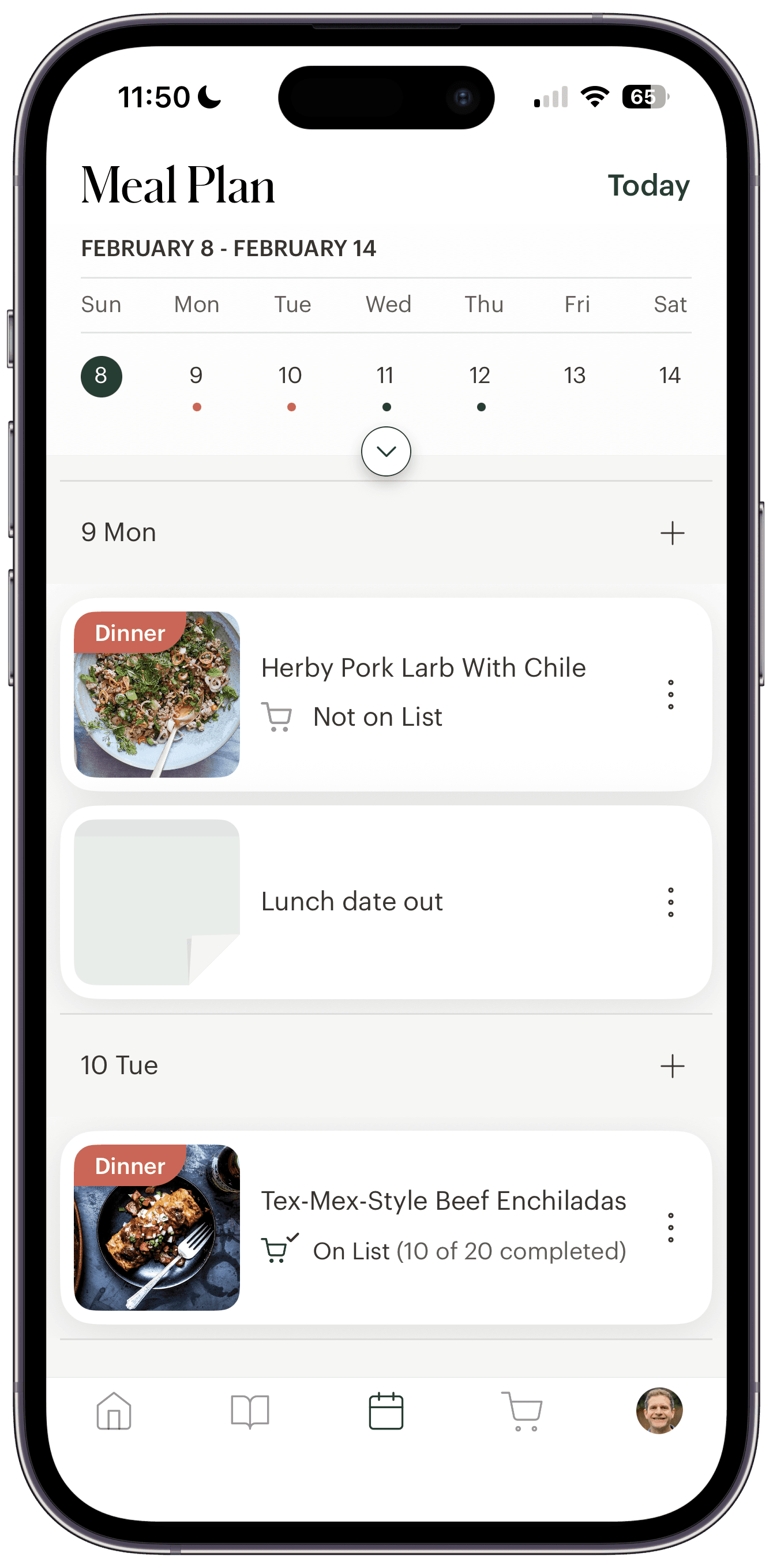
Deglaze is a recipe app for iPhone, iPad, Android and the web:
- Save recipes from anywhere. Share a recipe from a website, YouTube or Pinterest, or a video from TikTok, Instagram or Facebook. Deglaze reads the on-screen text and analyzes the video itself, not just the caption and the audio, so Reels with no voiceover still come through. Snap a cookbook page and it becomes a recipe too. Here's how to save recipes from TikTok.
- Plan the week. Add recipes to a meal plan calendar your household shares, or search popular recipe sites from inside the app when you want something new.
- Shop from one list. Your grocery list is sorted by aisle, and you can filter it by store.
- Let an assistant plan, if you like. Deglaze connects to ChatGPT, Claude, Gemini and Muse, so you can ask an assistant to plan a week from your saved recipes around your household's allergies. It adds the plan and the ingredients to Deglaze.
We're two people who love to cook, Angel and Jacob, and we've been building Deglaze since 2021. It has 4.9 stars from more than 5,000 App Store ratings worldwide.
Where it falls short: you can browse by diet tags like vegetarian, but there's no allergy filter or diet profile in the app itself, so a connected assistant is the way to plan around allergies. And like Mealime, it doesn't pick your dinners for you unless you ask an assistant to.
Meals Hub
Best for: Mealime users who mainly want Mealime's recipes back, for free.
Meals Hub is the meal planner inside the apps of Albertsons Companies' grocery chains, including Safeway, Albertsons, Jewel-Osco, Shaw's, ACME, Star Market and Tom Thumb. Mealime says Meals Hub is "supported by the same core team," still handles dietary preferences and food restrictions, and lets you "browse recipes, create meal plans, and generate shopping lists" even if there's no store near you. In the app, it's under the More tab. An Albertsons announcement of the earlier version says one click can "consolidate all the ingredients" into your shopping list.
Where it falls short: it lives inside a grocery chain's app, so you need an account with the chain and have to pick a store, and your list stays in that app. You'll also set up your dietary preferences again.
Paprika 4
Best for: people who want a straightforward recipe organizer with a planner.
Paprika 4 came out on November 6, 2026. It keeps your recipes and grocery lists, you plan by day, week or month yourself, and it can import from social media and scan recipes. It runs on iPhone, iPad, Mac, Android and Windows.
Where it falls short: it has no recipes of its own to pick from, and no diet filters.
AnyList
Best for: households that care most about a shared grocery list.
AnyList's grocery list is shared, you can save recipes from the web, and you plan on a meal calendar, per its features page. It runs on iPhone, Android, the web and Mac.
Where it falls short: you bring all the recipes yourself, and it has no diet filters.
Plan to Eat
Best for: people who already collect recipes and want a calendar that writes the list.
"Pick your meals, and we'll automatically build your grocery list," says Plan to Eat. It saves recipes from websites, Instagram and TikTok, plans on a calendar, and sorts the list by aisle. It's on iPhone, Android and the web.
Where it falls short: like Paprika and AnyList, it has no recipe collection of its own and no diet filters.
Samsung Food
Best for: a big recipe collection to browse, with AI-made weekly plans.
Samsung Food mixes public recipes with ones you save from any website, filters by "14 different diets," and shares grocery lists, per its App Store listing. The listing also says it can make "AI-personalized weekly meal plans." It's on iPhone, iPad, Android and the web.
Where it falls short: the large public catalog can take more browsing than Mealime's short list did.
Eat This Much
Best for: people who want the plan generated for them, especially around calorie or macro targets.
Eat This Much builds meal plans automatically, a day or a week at a time, and writes the grocery list for you. It filters by diet and lets you exclude ingredients for allergies. It runs on iPhone, Android and the web.
Where it falls short: it's built around calorie and macro targets more than quick weeknight dinners.
eMeals
Best for: families who want a fresh set of dinners each week and grocery delivery.
Each week, eMeals sends you 7 new recipes, per its App Store listing, from one of 15 meal plans such as Keto, Paleo, Gluten Free and Diabetic. You choose from them, and it can send your list to grocery services including Walmart, Kroger and Instacart. You can add your own recipes too.
Where it falls short: it's built around its own weekly menus, so it suits you less if you mostly cook recipes you've collected yourself.
How to move your Mealime recipes to Deglaze
Mealime's recipes can't be exported, so start from where each recipe came from:
- Install Deglaze on iPhone, iPad or Android, or use it on the web.
- Share the original page or video to Deglaze. On a recipe website, Instagram or TikTok, tap Share and choose Deglaze. It reads the recipe, including from the video itself.
- For cookbooks, printouts and screenshots, add a recipe from photos and pick the images. Deglaze reads the title, ingredients and steps.
- Check it and save it. Start with the dinners you cook most often.
How we compared
We read Mealime's closing page and support site, Albertsons Companies' own pages, and each app's own site and US App Store listing. We looked at what a Mealime user relied on: picking dinners quickly, filtering for diets and allergies, and getting a grocery list without retyping anything. We make Deglaze and use it ourselves. The other apps are described as their makers document them, and every fact about them links to that company's own page or store listing.
Questions
When did Mealime shut down?
Mealime shut down on October 21, 2026, according to its closing page.
Why did Mealime shut down?
Albertsons Companies bought Mealime in 2021, and Mealime says it's moving customers to Meals Hub, inside Albertsons' grocery apps, "to provide a more streamlined experience and continue enhancing these features."
Can I export my Mealime recipes?
No. Mealime didn't offer an export, and it said it would delete personal data when it shut down. Its own recipes are in Meals Hub. Recipes you imported aren't, so save them again from the original website or video in a recipe app such as Deglaze, which can also read cookbook pages and printouts from a photo.
Is Meals Hub free, and do I need to shop at Safeway?
Mealime says Meals Hub is "100% free" and that you can plan and make lists even if you can't shop at an Albertsons Companies store. You do need to use one of its store apps or websites and pick a store.
Which app is most like Mealime?
For Mealime's recipes, Meals Hub, since it has them. For picking a few quick dinners from a set of recipes and getting a list, eMeals and Samsung Food are close. Deglaze, Paprika, AnyList and Plan to Eat do the same with recipes you save yourself.
Does Deglaze make meal plans for me?
Deglaze doesn't pick meals on its own. You choose recipes and add them to your plan, or ask ChatGPT, Claude, Gemini or Muse to plan your week from your saved recipes, and the plan and grocery list land in Deglaze.
Can I get my recipes out of Deglaze?
One at a time, yes. You can print any recipe or download it as a PDF, and send recipes to other Deglaze users. Here's how printing and PDF export work in Deglaze.
Sources and changes
Everything below was checked on November 14, 2026:
- Mealime's closing page and support site
- Albertsons Companies' Meal Plans announcement (September 14, 2023)
- US App Store listings: Deglaze, Paprika, AnyList, Plan to Eat, Samsung Food, Eat This Much and eMeals
- The apps' own sites: Paprika, AnyList features, Plan to Eat, Samsung Food, Eat This Much and eMeals
If something here is out of date, email help@deglaze.app and we'll correct it.
Changes: November 16, 2026: first published.